1. Log into your SiteWorx account. (eg: www.example.com:2443/siteworx/ )
2. Under SiteWorx Menu, click the Hosting Features menu item if it is not already open.
3. Click the Domain menu item and then click on the Subdomain option.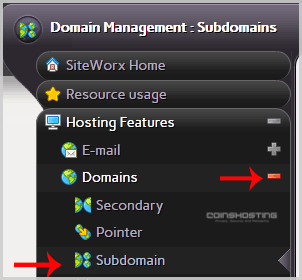
4. Under the "Add a Subdomain" tab, enter your subdomain name in the Subdomain field.
5. Click on the Add button.
- Home
-
Store
- Browse All
- Managed cPanel Hosting
- VPS - KVM Linux Server
- VPS - KVM Linux RDP Server
- VPS - KVM Windows RDP Server
- Dedicated Servers (USA)
- Dedicated Servers (Netherlands)
- Dedicated Servers (Switzerland)
- SSL Certificates
- Linux LXC VPS Containers
- Linux KVM VPS – SolusVM
- Register a New Domain
- Transfer Domains to Us
- Announcements
- Knowledgebase
- Network Status
- Affiliates
- Contact Us
-
More