To remove an email address, perform the following steps:
1. Log into your SiteWorx account (e.g. www.example.com:2443/siteworx/ ).
2. Under SiteWorx Menu, click the Hosting Features menu item if it is not already open.
3. Click the E-mail menu item and then click on the Mailboxes option.
4. Under the Existing E-mail Boxes tab, select the appropriate E-mail address you wish to remove and then click on the Delete button.
5. For confirmation, click again on the Delete button.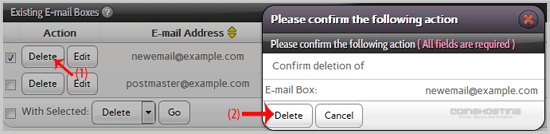
You should see a success message notifying you that your e-mail address has been removed.
- Home
-
Store
- Browse All
- Managed cPanel Hosting
- VPS - KVM Linux Server
- VPS - KVM Linux RDP Server
- VPS - KVM Windows RDP Server
- Dedicated Servers (USA)
- Dedicated Servers (Netherlands)
- Dedicated Servers (Switzerland)
- SSL Certificates
- Linux LXC VPS Containers
- Linux KVM VPS – SolusVM
- Register a New Domain
- Transfer Domains to Us
- Announcements
- Knowledgebase
- Network Status
- Affiliates
- Contact Us
-
More