You can change the Disk Driver to Virtio or IDE before installing the operating system, but should you change this after installing the OS. It will show an error that the disk is not found or a similar error. Only change this before Installing/Reinstalling the OS.
1. Login to your SolusVM Control Panel.
2. If you have multiple VPS, select the appropriate one.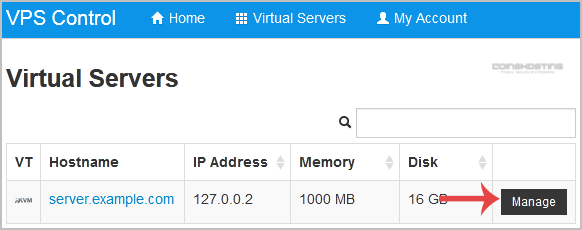
3. Scroll down, and under the settings tab, you can find the Disk Driver option. Select the appropriate Disk Driver from the Drop-Down Menu.
4. Reboot your VPS, and you will be able to install/reinstall your OS, which will use your selected disk driver.
- Home
-
Store
- Browse All
- Managed cPanel Hosting
- VPS - KVM Linux Server
- VPS - KVM Linux RDP Server
- VPS - KVM Windows RDP Server
- Dedicated Servers (USA)
- Dedicated Servers (Netherlands)
- Dedicated Servers (Switzerland)
- SSL Certificates
- Linux LXC VPS Containers
- Linux KVM VPS – SolusVM
- Register a New Domain
- Transfer Domains to Us
- Announcements
- Knowledgebase
- Network Status
- Affiliates
- Contact Us
-
More